
In this part, i am going to show my experience how to deploy simple Angular in AWS S3.
Step 1: Assuming you already have simple site with Angular CLI
ng new PROJECT-NAME
cd PROJECT-NAME
ng serve
Next, using ng build to compiles the application into an output directory. It will generate code in the dist/ directory. Open index.html in dist folder.
Change
base href=“/“
to
base href=“./“
Step 2 : Deploy project in AWS S3
Go to AWS S3 create 2 bucket yoursite.com and http://www.yoursite.com (it should be same with your domain) .
Upload all of the files in dist folder into yoursite.com. Config the bucket like:
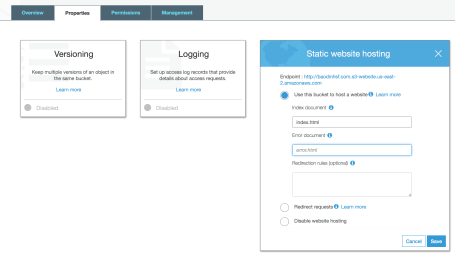
Now set Permission for bucket. Go to Permission tab: create Bucket Policy:
{
    "Version": "2012-10-17",
    "Statement": [
        {
            "Sid": "PublicReadForGetBucketObjects",
            "Effect": "Allow",
            "Principal": "*",
            "Action": "s3:GetObject",
            "Resource": "arn:aws:s3:::yoursite/*"
        }
    ]
}
Now you can test your website using Endpoint in Bucket Properties.
One problem i met is when refreshing a page it display error:
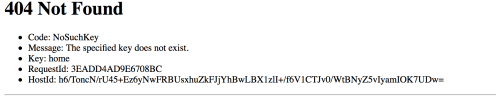
It occurs because AWS S3 does not route for you. I solved it by set the Error document in Properties is index.html. It is solved
Next part i am going to show how to using AWS S3 and Route 53.
 Bao Dinh